
Quick answer: Agencies use AI to draft timesheets and chase missing logs, to route only exceptions to a manager for approval, and to turn live task data into client status updates and reports a person reviews before they go out. The win comes from one source of truth for clients, projects and tasks; without it, AI just produces faster confusion. People keep every decision about scope, pricing and staff.
ProMonkey is a Gurugram based AI automation agency that has delivered 240+ projects since 2016, including the operations platform that runs Coffee & Creative, a creative and advertising agency. I spend most of my week with client teams, and agency admin is a problem I recognise from both sides of the table.
Where does agency admin time actually go?
Ask any account manager what eats their week and the answers are remarkably consistent:
Chasing the team for timesheets, end of day logs and task updates.
Chasing clients for approvals, feedback and payments.
Answering "where is my work?" by email, phone and chat, often several times a day per client.
Building reports by copying numbers from three tools into a deck.
Reconciling what was done, what was approved and what was billed.
None of this is creative work, and almost all of it follows rules. That is exactly where AI helps, as long as it is reading from data you trust.
How can AI draft and chase timesheets without surveillance?
Timesheets fail for a simple reason: people fill them in from memory at the end of the week. AI can make that easier without turning into a monitoring tool.
Draft from work that already happened. If tasks, status changes and comments live in one system, AI can propose a draft log for the day ("worked on the Diwali campaign banners, moved two tasks to review") that the person edits and confirms in seconds. The person confirms; the AI only drafts.
Chase gently and on time. A short nudge at the end of the day to anyone with a missing log works better than a manager's email on Friday. Coffee & Creative's platform does exactly this: our Sarthi agent chases missing end of day logs and nudges on overdue tasks.
Draw clear lines. Good practice is to draft only from work records, never from private messages, personal chats or screen activity. Tell the team what the AI reads and what it does not. A tool that feels like surveillance will be quietly resisted, and the data will get worse, not better.
How should approvals work: auto approve rules and exception queues
Most approval queues are full of things nobody needs to look at. The fix is to sort approvals by how confident the system can be.
The same idea works for client deliverables. Routine internal steps can move on their own, while anything a client sees goes to a person first. Writing these rules down is the real work, and we cover the thinking in more detail in our post on human approval gates for AI agents.
Client approvals need fixing too. When clients approve over email or chat screenshots, nobody can find the decision later. A client portal where the client approves or sends back work with notes turns approval into a status change the whole team can see.
How do client status updates and reports write themselves?
Once tasks, approvals and invoices live in one place, the status update is already sitting in the data. AI just has to say it clearly.
On demand answers. A client asks "where is the brochure?" and gets an answer from live task data: in review, due Thursday, waiting on your logo files.
Scheduled digests. A daily or weekly summary per client: what was delivered, what is waiting on them, what is due next.
Monthly reports. A draft report built from delivered work, approvals and outstanding items, which the account manager reviews and adds commentary to before it goes out.
The rule we hold to: AI drafts, a person decides what the client sees whenever the content is new or sensitive. Routine digests can be sent automatically within rules you set; anything about scope, quality or a problem on the account goes through a person.
What has to be in place first?
This is the part most AI tool pitches skip. AI is only as good as the data it reads, and in most agencies that data is scattered.
Before adding AI, you need:
A clean client and project map. Every client, every project, every task, with an owner.
Real deadlines. Dates and times in fields, not "end of week" in a comment.
Statuses with history. So the system knows what moved, when and by whom.
One system, or at least one source of truth. Not three tools that disagree.
Access rules enforced in the system. So a client can never see internal comments by accident.
A safe way for AI to read the data. Read only access with scoped queries, not a key to everything.
We go deeper on point 6 in what makes a CRM AI ready. Skip these steps and AI will confidently send a client the wrong deadline.
Example: Coffee & Creative's move from three portals to one platform
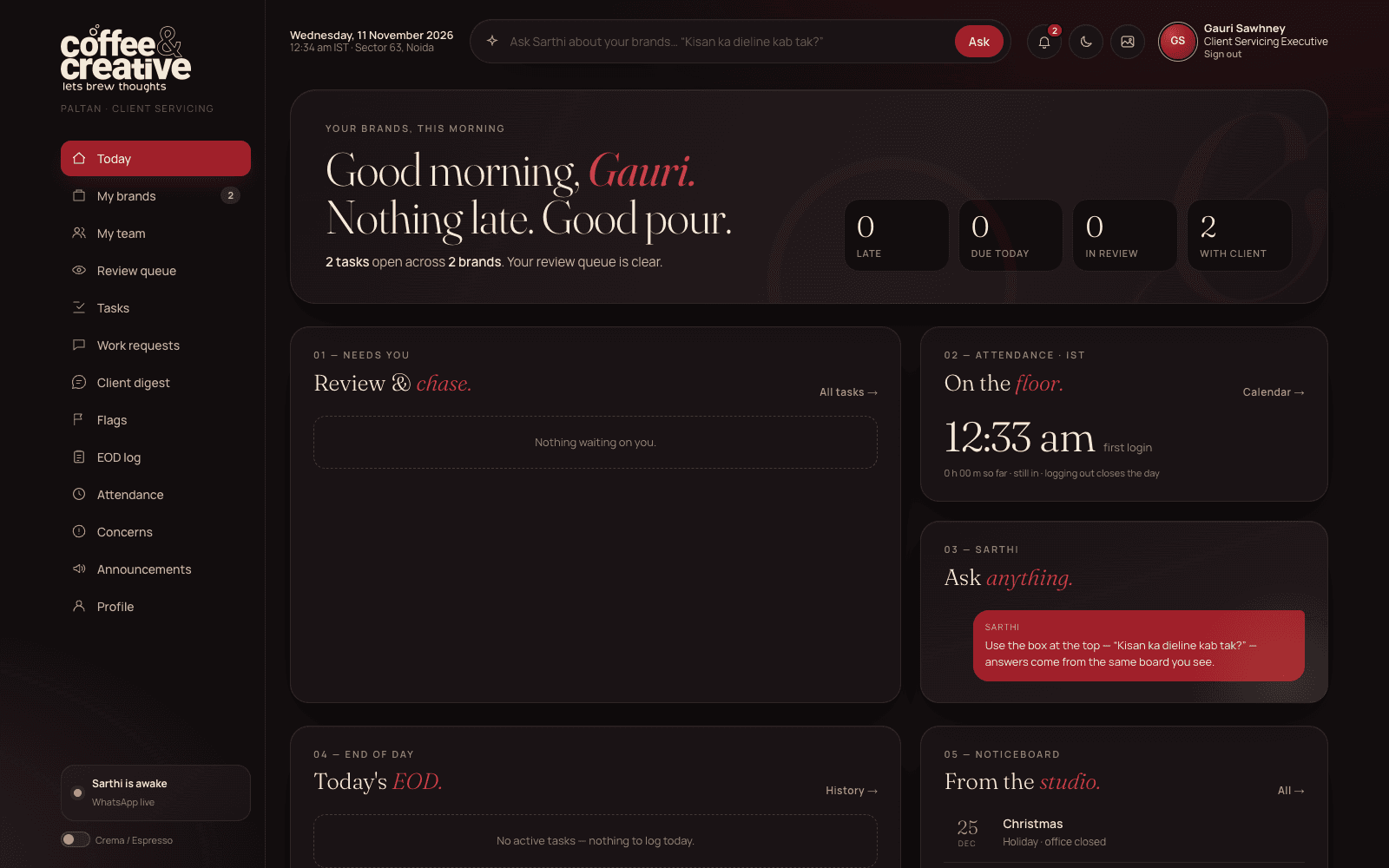
Coffee & Creative is a creative and advertising agency in India with over two decades in the business, a team of around 50 and about 20 active brand accounts. Its operations ran across three separate legacy portals, one each for admins, the team and clients, each with its own login and its own gaps. Deadlines lived as free text, approvals happened over chat screenshots, and invoices were chased by hand.
We rebuilt it as one platform with one login and three role based views: Admin, Team and Client.
Admin sees overdue work, tasks waiting on clients, outstanding invoices and a health score per brand on one screen.
Team members work real tasks with proper statuses and deadlines, log end of day updates per task, and get a nightly performance score built from eight transparent parameters, such as on time delivery and client approval rate, with weights the admin can tune.
Clients see only the work shared with them, approve or send back deliverables with notes, raise requests and pay invoices online through payment links.
The schema was designed from the start so an AI agent can read it safely, with a read only role and scoped queries. Our Sarthi agent sits on top: it answers status questions, sends daily digests to clients, chases missing end of day logs and nudges on overdue tasks, while the platform itself never sends a message on its own.
The outcome: 3 portals became 1, late work shows up the moment it is late instead of at month end, and clients approve work and pay invoices without chase emails.
When should an agency not build custom?
If you are a small team whose work already fits a packaged project tool, and per seat pricing is manageable, stay with it and add AI features the tool offers. A custom build is worth it when your roles, approvals or client experience do not fit the tools, when you are paying for several products that do not talk to each other, or when you want your operational data in one place an AI can safely read. Building custom to fix a process you have not written down yet will only make the mess more expensive. Our agencies and professional services page compares the common options fairly.
If you want to see where AI would save your team the most hours, book a call and walk us through your brief to invoice flow.
Frequently asked questions
Can AI fill in agency timesheets automatically? AI can draft them from work already recorded, such as task updates and status changes, and the person confirms or edits. It should not log time on its own or read private messages.
Which approvals can be automated in an agency? Routine, rule based ones, such as timesheets that match logged work. Anything about scope, budget, credit notes, client access or work a client will see should go to a person.
How do agencies automate client reporting? By keeping tasks, approvals and invoices in one system, then letting AI turn that live data into status answers, scheduled digests and draft monthly reports that an account manager reviews.
Do we need new software before using AI for agency admin? You need one reliable source of truth for clients, projects and tasks. If your data is spread across tools that disagree, fix that first, or AI will repeat the confusion faster.
Has ProMonkey built this for a real agency? Yes. We rebuilt Coffee & Creative's three portals into one platform with Admin, Team and Client views, and our Sarthi agent answers status questions, sends client digests and chases missing end of day logs.