Short answer: Build human approval into the structure of the AI system, not into a settings page. In Dollar Traq, approval gates are nodes in the orchestration graph itself, so nothing sends, pays or disputes without a person tapping approve, and every session is checkpointed and replayable for audits. A toggle can be switched off on a busy day. A node in the graph cannot.
Every AI vendor now says "human in the loop". Very few explain where the loop is, who can remove it, and what happens if they do. For automation that touches money, customers or compliance, those are the only questions that matter.
What is the difference between an approval setting and an approval gate?
An approval setting is a feature. An admin can turn it on or off. The agent checks the setting and decides whether to wait for a person.
An approval gate is structure. The path from "agent proposes" to "action happens" physically passes through a step that only a person can complete. There is no code path around it.
The difference shows up on the worst day. When the team is overloaded and a manager says "just let it run", a setting gets switched off. A gate does not.
Which actions need a human approval gate?
Our rule of thumb: any action that is expensive or hard to undo, or that a customer or regulator will see.
Money moving. Payments, refunds, credits.
External messages. Anything sent to a customer, candidate, carrier or partner on your behalf.
Disputes and rejections. Declining a carrier, rejecting a claim, disputing a charge.
Contact with people. Calling or emailing a candidate for the first time.
Everything else, such as reading records, scoring, drafting, summarizing and flagging, can usually run without waiting.
What we actually built: Dollar Traq
Dollar Traq is an AI operating system for US freight brokers, with specialist agents for vetting, pricing, tracking, documents and inbound calls, coordinated by an orchestrator called Fleetra.
Approval is part of that orchestration:
Fleetra's approval gates are nodes in the orchestration graph, so nothing sends, pays or disputes without a person tapping approve.
Every session is checkpointed and replayable for audits.
Hard stop gates in the 149 rule Trust Score, aligned to CAVRA, cannot be disabled by brokers.
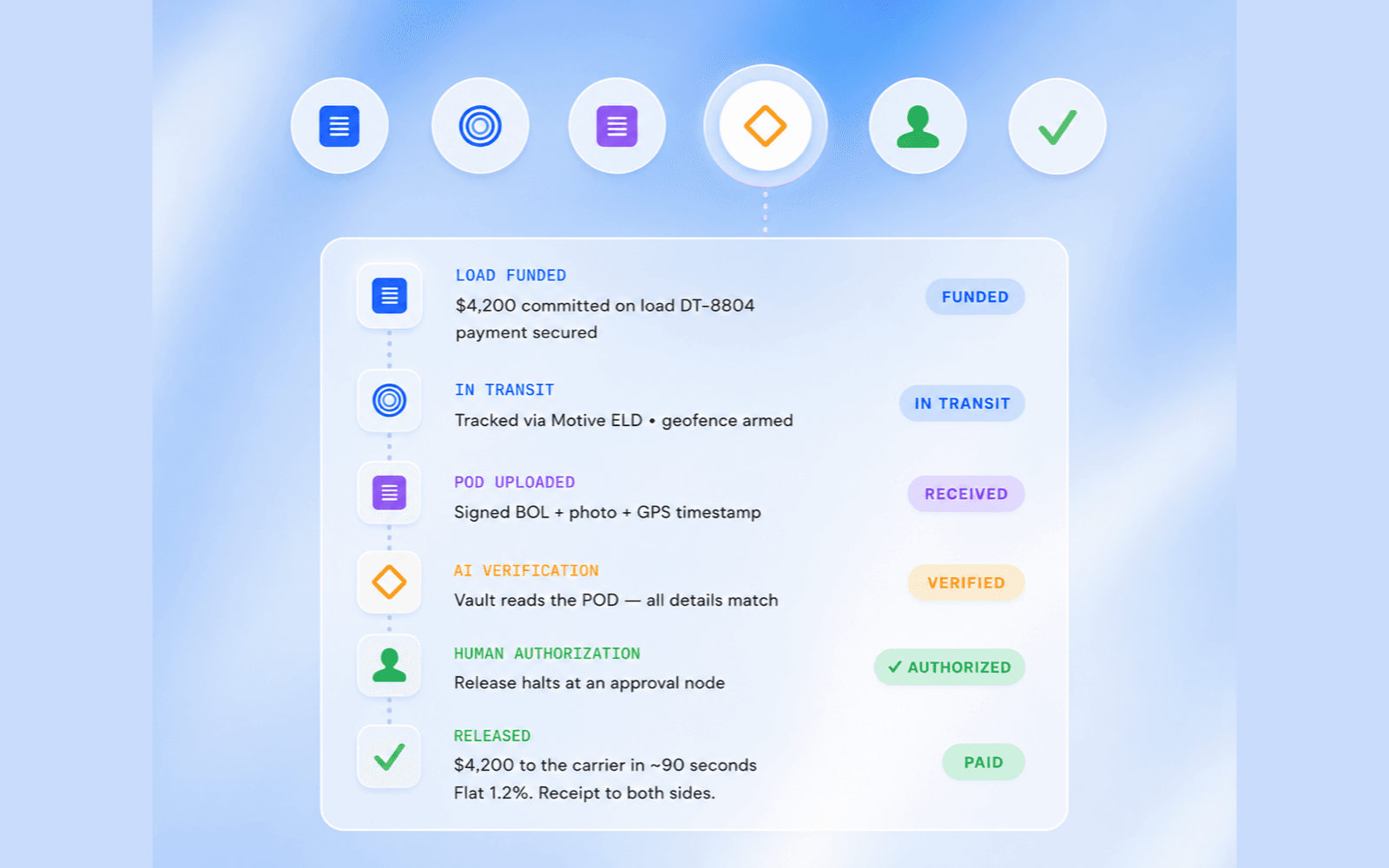
Payments are conditional: funds are committed before pickup and released only when the proof of delivery is AI verified against the load and a person authorizes it. Carriers are then paid in about 90 seconds at a flat 1.2% fee.
On calls, Scout, the voice agent, hands anything outside the rules to a person with the context already written up.
The platform is multi tenant and customizable per broker, with settings, guardrails and feature toggles for every agent. The approval nodes are not among the things a toggle removes.
How do Pratibha and Sarthi apply the same principle?
The gate looks different in each product, but it is always structural.
Pratibha, our AI recruiter, screens CVs and scores them, but a person approves the shortlist before any candidate is contacted. That rule is absolute.
Sarthi, our AI concierge platform, has two levels of control: the platform sets hard guardrails, and each company configures its agents within them. Human handoff is configurable per situation.
Coffee & Creative's CRM gives its AI agent a read only role and named queries, so the agent can answer questions without being able to change records.
Does human approval slow everything down?
Only if you gate the wrong things. The trick is to let AI do all the gathering, checking and drafting, so the person's job is a single decision with the evidence already on screen. In Dollar Traq, the person approving a payment is not re checking the proof of delivery. The system has already verified it. They are confirming a decision.
If your approvers are redoing the AI's work, the gate is in the wrong place or the evidence is not being shown.
What is the most common mistake?
Our opinion: adding the human at the end instead of designing around them.
Teams build a fully automatic pipeline, then bolt on an "approve" button before the last step. The person sees a final output with no reasoning and approves it because it looks fine. That is a rubber stamp, not oversight.
Design the approval screen first. Ask what a person needs to see to say yes or no in under a minute, and make the agent produce exactly that. Dollar Traq's Trust Score shows its inputs, weights and the government records behind every score for the same reason.
How do you audit what an AI agent did?
Log sessions, not just outcomes. Dollar Traq checkpoints every session so it can be replayed. Coffee & Creative's CRM keeps a full audit trail of every change, with who, what and when. When something goes wrong, you want to replay the decision, not reconstruct it from memory.
What does it cost?
Every build on our pricing page includes a human approval step at every AI stage. A single workflow such as back office automation starts from $3,000, an AI voice agent from $5,000, and a multi agent operations platform from $12,000. Discovery is $750, credited to the build.
Read the Dollar Traq case study, our post on the 80/20 of operations automation, or book a call.
Frequently asked questions
What does human in the loop mean for AI agents? A person reviews and approves an AI's proposed action before it takes effect. In the systems we build, that approval is part of the architecture for any action that sends, pays or disputes.
Can an admin turn off human approval? Not in Dollar Traq's design. Approval gates are nodes in the orchestration graph, and the Trust Score's hard stop gates cannot be disabled by brokers.
Which AI actions need human approval? Anything that moves money, sends an external message, rejects or disputes, or contacts a person for the first time.
Does approval make AI automation slow? Not if the AI does the gathering and checking first, so the person makes one decision with the evidence on screen.
How do you audit an AI agent's decisions? Log and checkpoint whole sessions so they can be replayed. Every Dollar Traq session is checkpointed and replayable for audits.